











Create a Rollino Casino Account — Complete Registration & Login Guide
Who is this page for?
This page is for new players creating their first Rollino Casino account, and returning users who want to optimize their access for security, speed, and smooth withdrawals. We cover all details: choosing a sign-up method, verifying email/phone, enabling 2FA, selecting currency, applying a promo code correctly, setting responsible limits, and preparing KYC.
Before You Begin (Requirements & Prep)
- Legal age in your region (usually 18+, possibly higher locally).
- Exactly one personal account per person/household/IP/device.
- Accurate data: name, date of birth, and address must match your ID documents.
- Valid email (will be confirmed) and/or mobile number for security prompts.
- Stable internet & modern browser; no VPN during registration/cashier/KYC.
- Account currency aligned with your deposit method (reduces FX fees).
- Optional: a password manager (e.g., Bitwarden, 1Password) for strong, unique passwords.
Choose Your Registration Path
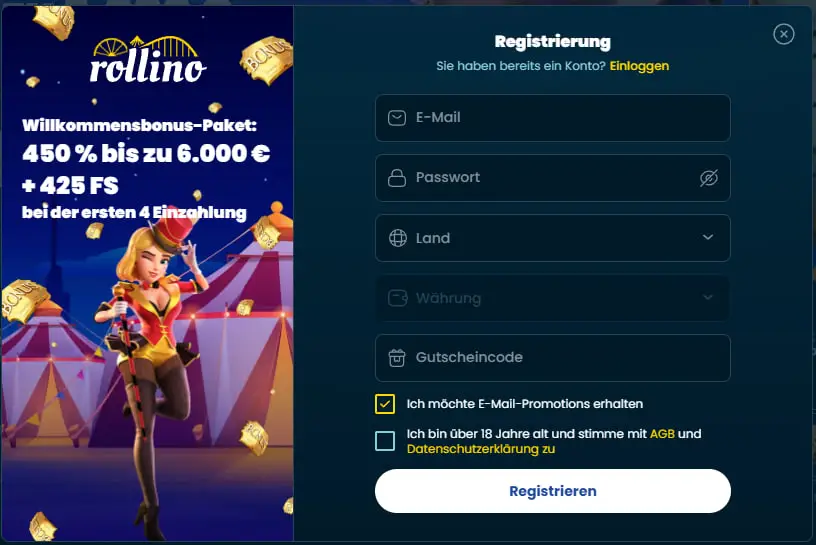
Rollino typically offers three paths. Choose what suits you best:
| Method | Speed | Security | Best for |
|---|---|---|---|
| Fast | Excellent with 2FA | Most users; full control over credentials | |
| Mobile | Fast | Good with SMS + 2FA | Those who prefer SMS prompts & notifications |
| Google/Apple/Facebook | Fastest | Strong with SSO + 2FA | Single sign-on without many passwords |
Method A — Register by Email (Step by Step)
- Click Register.
- Select Email and enter the address correctly.
- Set a strong password (see Security Basics).
- Choose account currency; optionally enter a promo code.
- Accept Terms & Privacy and confirm legal age.
- Create account and open the confirmation email → click the link.
- Log in, complete your profile, set limits, and enable 2FA.
Didn’t receive an email? See Email Verification (spam/promotions folder, whitelist sender, resend link).
Method B — Register by Mobile Number (Step by Step)
- Register → choose the Phone tab.
- Enter your number with country code (no leading zero).
- Set a strong password, choose currency, optional promo code.
- Accept the Terms and confirm legal age.
- Create account → enter the SMS code (time-limited).
- Log in, complete your profile, set limits, and enable 2FA.
Email Verification: Delivery & Troubleshooting
- Check folders: inbox, spam/junk, promotions (Gmail), updates.
- Search mailbox: “Rollino,” “verify,” “confirmation,” or the domain.
- Whitelist sender: add “no-reply” to contacts, then resend link.
- Open in browser: fully open shortened mobile links on desktop.
- Link expired? Request a new link and click it promptly.
Phone/SMS Verification: Codes & Common Errors
- Format & code: always use “+country code”; no special characters/spaces.
- Delivery delay: wait up to 120 s; then request a new code.
- No reception? Toggle airplane mode, switch networks, disable Wi-Fi calling; allow short codes.
- Wrong/expired code: request a new one and enter carefully.
- Rate limit: too many attempts trigger a temporary lock; retry after cooldown or contact support.
Complete Your Profile (Faster KYC)
A complete profile prevents payout queries. Enter your legal name and current address exactly as on your documents.
- Full name & date of birth (as in your ID).
- Residential address (street, city, ZIP, country).
- Preferred language and contact channels (email/SMS/push).
- (Optional) Manage or opt out of marketing settings.
Pro tip: If you move, update your address before withdrawing; mismatches often trigger additional checks.
Security: Passwords, 2FA, Trusted Devices
Create a strong password
- At least 12–16 characters with letters, digits, and symbols.
- No reuse of passwords from other websites.
- Use a passphrase (e.g., “violet-tea-cactus-39-river”).
- Store it in a password manager; don’t leave sticky notes.
Enable two-factor authentication (2FA)
- Open Account → Security → Two-Factor Authentication.
- Select an authenticator app (Google Authenticator, Authy, 1Password).
- Scan the QR code, enter the 6-digit code, and confirm.
- Store backup codes securely.
Trusted devices & sessions
- Mark only your own device as trusted (never on shared computers).
- Review active sessions regularly and sign out unknown ones.
Choose Currency, Enter Promo Code, Decide on Bonus
Choose a primary currency that matches your bank/e-wallet to avoid conversion fees and queries. Enter promo codes during registration or at the cashier; many deals also require an opt-in.
| Take the bonus | Cash only | |
|---|---|---|
| Pros | Extra funds/FS, more playtime | No WR rules; full flexibility |
| Cons | Wagering (WR), max bet, game restrictions, deadlines | No “leverage” from bonus funds |
| Ideal for | Planned short sessions across the week | Occasional evenings, live tables |
Rule of thumb: Only activate a bonus if you can complete WR calmly within the time; otherwise, go cash-only.
Set Limits for Responsible Play
Configure right after registration under Account → Responsible Gaming:
- Deposit limits (daily/weekly/monthly)
- Loss limits and stake limits
- Session time & reality checks
- Time-out (days/weeks) & self-exclusion (long term)
Stricter limits take effect immediately; relaxations usually have a cooling-off period (e.g., 24 hrs).
KYC Onboarding After Sign-up
KYC verifies your identity and protects your account. It’s often required before your first withdrawal.
- Identity: passport, ID card, or driver’s license (front/back, color).
- Address (≤ 3 months): utility bill, bank statement, official letter.
- Payment method proof: card (first 6/last 4), e-wallet screenshot with name/email, crypto ownership proof if requested.
- Liveness/selfie may be requested; follow on-screen instructions.
Photo tips: good light, no glare, all corners visible, name/address readable, mind file size.
Login Flow, Recovery & Trusted Devices
Standard login
- Click Log In.
- Enter email/phone/username + password.
- Enter the 2FA code (if active).
- Optionally mark the device as trusted.
Reset password
- Select Forgot password.
- Provide email or phone.
- Follow the link/SMS and set a strong new password.
Unknown login alert? Change your password immediately and end unknown sessions under Account → Security.
Register on Mobile & Rollino App/PWA
The mobile site is fully responsive; in some regions, an app is also available. Alternatively, install the PWA (“Add to Home Screen”) for app-like performance.
- Biometrics: Face/Touch ID streamlines secure logins.
- Push notifications: enable for verifications & bonus alerts.
- Stay in the tab: don’t switch away during payments/confirmations.
Accessibility & Inclusive Registration
- Keyboard navigation for all fields & actions.
- ARIA labels & clearly visible focus states.
- High contrast & scalable font sizes.
- Alt text for icons & messages.
- Error messages are not color-dependent and explained in plain language.
Privacy: What’s Collected & Why?
During registration, Rollino processes contact data (email/phone), profile data (name, date of birth, address) and technical metadata (device, IP) for security, fraud prevention and legal compliance. You can withdraw consents (marketing, notifications) anytime under Account → Settings.
Regional Notes (Jurisdiction, Currency, Methods)
- Jurisdiction: access & features are regulated locally; follow the laws of your residence.
- Currency: choose the one matching your deposit method (EUR, CHF, NOK, PLN, etc.).
- Methods: cards, e-wallets, bank transfer; in some regions also crypto.
- Language: at least German/English, more languages depending on region.
Error Messages: Meaning & Fix
| Message | Likely cause | Solution |
|---|---|---|
| Email already in use | Account already exists | Reset password or use a different email |
| Invalid phone number | Incorrect format/country code | Re-enter with +country code and digits only |
| Weak password | Complexity rules not met | 12–16+ characters, mixed character types; use a passphrase |
| Too many attempts | Rate limit active | Wait for cooldown and try again |
| Region not supported | Geo restriction | Check local rules; don’t use VPN to bypass |
| Confirmation link expired | Clicked too late | Request a new link and confirm promptly |
| SMS code incorrect | Typo or expired | Request a new code and enter carefully |
Quick Checklists (Registration / Bonus / First Deposit)
Registration
- VPN off, stable connection, up-to-date browser.
- Email/phone ready; password manager set up.
- Select currency that matches your payment method.
- Complete profile, enable 2FA, set personal limits.
Bonus
- Read the promo card (WR, max bet, games, deadline).
- Opt in & apply promo code correctly if needed.
- Plan sessions so WR is comfortably achievable.
First deposit
- Use a method in your own name; ideally the same rail for withdrawals.
- Choose an amount that fits your limits.
- Keep the payment confirmation (screenshot/receipt).
Registration FAQ
Can I register without a phone number?
Yes, via the email method. However, adding a mobile number makes 2FA, security checks, and account recovery easier.
Do I have to complete KYC right after sign-up?
Not necessarily. It’s required before your first withdrawal at the latest. Completing it early = less wait time at cash-out.
Can I change the selected currency later?
Often only before the first deposit. Contact support; ideally choose correctly during registration.
How secure is social login (Google/Apple/Facebook)?
Very secure when combined with 2FA. Rollino only receives data necessary for sign-in and will not post to your feeds.
Is the welcome bonus activated automatically?
Depends on the promotion: sometimes opt-in, sometimes automatic. Read the promo card and check terms (WR, max bet, deadlines) before depositing.
I’m not receiving the confirmation link. What should I do?
Check spam/promotions, whitelist the sender, request a new link, or try another email. See Email Verification.
Why is my registration blocked?
Common reasons: VPN active, region not supported, data mismatches. Disable VPN, check local rules, and enter details exactly as in your ID.
Is a second sign-up with different data allowed?
No. Duplicate accounts are prohibited and can lead to restrictions or closure.
Contact Support — Templates
- Resend confirmation link: “Hi, my email is [email]. Please resend the confirmation link; the previous one expired.”
- SMS code not arriving: “Hi, my number is [+country code number]. I’m not receiving the SMS code. Could you check delivery and lift any limits?”
- Currency adjustment: “Hi, I accidentally chose [currency]. Is it possible to switch to [currency] before the first deposit?”
Wrap Up & Start
- Create your account via email, phone, or SSO.
- Verify (email/SMS), complete your profile.
- Secure it with a strong password & 2FA.
- Set limits that match your budget & pace.
- Choose: cash-only or a bonus you can complete comfortably.
All set — your Rollino Casino account is ready. Play responsibly and keep an eye on time & budget.
Method C — Register with Google/Apple/Facebook
Note: You can disconnect SSO later under Account → Security; then you’ll use email + password.